
For a new user, the number of menus, game categories, account tools, promotions, wallet options, and activity sections can initially feel like a lot. But once you understand what each section does, navigating DG CLUB becomes much simpler.
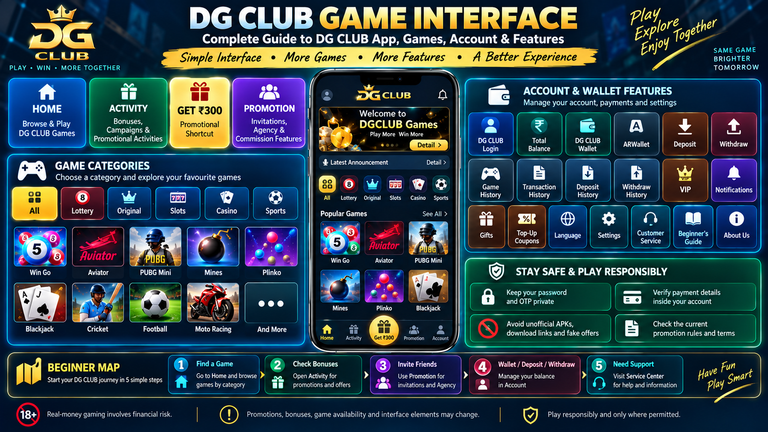
The DG CLUB Game interface is designed around several main areas, including games, account management, wallet functions, promotions, activities, invitations, transaction records, and customer support.
Whether you access DG CLUB Games through the website or a supported DG CLUB App, the basic layout shown in the screenshots follows a mobile-first structure.
This guide explains the DG CLUB interface step by step, including the Home screen, game categories, Account page, DG CLUB Wallet, Deposit, Withdraw, Activity, Promotion, Agency, Invite Wheel, bonuses, history sections, and customer-service tools.
Note: Interface elements, game availability, promotional offers, bonuses, and displayed amounts can change. Always check the current information shown inside your DG CLUB account before participating or making a transaction.
DG CLUB Game Interface at a Glance
The main DG CLUB interface can be divided into five important areas:
| DG CLUB Section | Main Purpose |
|---|---|
| Home | Browse and access DG CLUB Games |
| Activity | View bonuses, campaigns and promotional activities |
| Get ₹300 | Central promotional shortcut |
| Promotion | Invitations, Agency and commission features |
| Account | Balance, wallet, payments, history and settings |
This structure makes it easier to understand where to go for different tasks.
If you want to play a DG CLUB Game, start with Home.
If you want to check promotions, open Activity.
If you want invitation or Agency information, use Promotion.
If you need your balance, wallet, deposit, withdrawal or account settings, open Account.
1. DG CLUB Home Interface
The DG CLUB Home screen is the main entry point for browsing games.
At the top of the interface, the DG CLUB logo is displayed along with shortcut icons. Below this, users can see promotional banners, announcements, game categories and individual game tiles.
The screenshots show a welcome message for DGCLUB Games, followed by a Detail button.
Below the announcement is the main DG CLUB game-category menu.
The visible categories are:
- All
- Lottery
- Original
- Slots
- Casino
- Sports
This category system is one of the most useful parts of the DG CLUB Game Interface because it lets users narrow down the available games instead of scrolling through everything.
2. DG CLUB Game Categories
The category menu helps organize the large selection of DG CLUB Games.
Each category provides a different type of gaming content.
All Games
The All section provides access to the broader DG CLUB game collection.
If you are not looking for a particular type of game, this is the easiest place to browse.
DG CLUB Lottery
The Lottery section shown in the screenshots includes:
- Win Go
- K3 Lotre
- 5D Lotre
- TRX Win
- Moto Racing
The category provides different number, result and themed game formats.
DG CLUB Original
The Original section contains a large collection of individual titles.
The screenshots show games including:
- Aviator
- PUBG Mini
- Chicken Road 2
- Cricket
- Boom
- Andar Bahar
- Mines Pro
- Javelin
- Limbo
- Win Go
- Mines
- Keno 80
- Treasure Wave
- Bomb Wave
- Treasure
- Draw Poker
- Pharaoh
- Space Dice
- Hotline
- Neon
- Goal
- Mini Roulette
- Plinko
- Dice
- Hilo
- Wheel
The exact selection may change as the DG CLUB platform updates its game library.
DG CLUB Slots
The Slots section organizes slot-style games into dedicated collections.
The screenshots show collections associated with:
- Bgaming
- CQ9
- EVO Electronic Slots
This makes it easier for users searching specifically for DG CLUB Slots.
DG CLUB Casino
The Casino section provides access to casino-style games.
Visible formats include:
- Blackjack
- Dice
- Hilo
- Plinko
- Heads & Tails
- Roulette
- Poker
- Keno
- Coin Flip
DG CLUB Sports
The Sports category provides sports-related and sports-themed game options.
The screenshots show themes including:
- Cricket
- Football
- Racing
- Penalty
- Moto racing
This gives the DG CLUB Game library additional variety beyond traditional casino-style formats.
3. DG CLUB Game Interface on Mobile
The supplied screenshots clearly show a mobile-focused layout.
Game tiles are arranged in a three-column format, allowing users to browse several titles without taking up excessive screen space.
This design works particularly well for users accessing DG CLUB on a smartphone.
Each game is represented by an individual image and title, making it possible to recognize games visually while scrolling.
The mobile interface also keeps the main navigation fixed near the bottom of the screen.

4. DG CLUB App Interface
Users searching for the DG CLUB App are generally looking for a convenient way to access their account and games from a mobile device.
The interface shown in the screenshots includes mobile-friendly navigation, game categories, account tools, wallet functions, promotions and activity sections.
If you are using a DG CLUB application, always obtain it through the official supported source and check that the application matches the legitimate platform.
Avoid downloading an APK from an unknown website simply because it uses the DG CLUB name.
For searches such as DG CLUB App Download or DG CLUB Download, users should verify the current official download instructions before installing anything.
5. DG CLUB Login and Account Access
After DG CLUB Login, the Account section becomes the central place for managing your profile and account-related features.
The screenshot shows several pieces of information at the top of the account page:
- Profile image
- Member name
- VIP indicator
- UID
- Last login time
- Total balance
The UID is displayed with a copy icon, making it easier to copy when needed for account-related communication.
Users should keep account credentials and sensitive information private.
6. DG CLUB Account Dashboard
The DG CLUB Account page is more than a profile page.
It acts as a control centre for:
- Balance
- Wallet
- Deposit
- Withdraw
- VIP
- Game History
- Transaction History
- Deposit History
- Withdraw History
- Notifications
- Gifts
- Top-Up Coupons
- Game Statistics
- Language
- Settings
- Customer Service
- Beginner’s Guide
- About Us
This makes Account one of the most important areas of the entire DG CLUB interface.
7. Total Balance in DG CLUB
At the top of the Account page is the Total balance section.
The supplied screenshot shows:
₹0.00
This is the balance displayed by the example account in the screenshot and should not be interpreted as a standard amount for all DG CLUB users.
A refresh-style icon appears next to the balance.
There is also an Enter wallet button that provides direct access to wallet-related functions.
8. DG CLUB Wallet
The DG CLUB Wallet area is closely connected with account balance and payment functions.
From the Account page, users can see shortcuts for:
- ARWallet
- Deposit
- Withdraw
- VIP
The Enter wallet button also provides another route into wallet functionality.
When using wallet or payment features, always check the current instructions displayed within the account before completing a transaction.
9. DG CLUB ARWallet
ARWallet appears as one of the main wallet shortcuts.
It is displayed alongside Deposit, Withdraw and VIP on the Account page.
The exact features available through ARWallet may depend on the current platform configuration, so users should check the information shown after opening the option.
10. DG CLUB Deposit
The Deposit option is clearly visible on the Account dashboard.
Users can access the available deposit functionality directly from this shortcut.
Before confirming a deposit, check:
- The amount
- The selected payment method
- The payment information
- The transaction details
- The confirmation screen
Only use payment instructions displayed through trusted DG CLUB channels.
11. DG CLUB Withdraw
The Withdraw button appears next to Deposit on the Account screen.
This provides access to DG CLUB Withdraw functionality.
The Account page also has a separate:
Withdraw – My withdraw history
option.
This creates a useful distinction between starting a withdrawal and checking previous withdrawal records.
Before submitting a withdrawal, carefully review the destination details and any current requirements displayed by the platform.
12. DG CLUB VIP
The Account screen includes a VIP shortcut, while the user’s account area also displays a VIP indicator.
Users interested in VIP features can open the relevant section to check the current levels, requirements and applicable benefits.
VIP terms can change, so users should rely on the current information shown within DG CLUB.
13. DG CLUB Safe Feature
The Account screenshot also displays a feature called Safe.
The supplied screen shows the following information:
“The daily interest rate is 0.1%, and the income is calculated once every 1 minutes.”
The displayed Safe balance is ₹0.00 in the example account.
This is a platform feature visible in the screenshot. Users should carefully review the current terms, conditions and financial implications before using any feature that refers to balances, income or interest.
14. DG CLUB Game History
The Account page contains a dedicated Game History option labelled:
“My game history”
This gives users a location to review recorded game activity.
Game History is different from the general transaction record, so users should use the section that matches the information they are looking for.
15. DG CLUB Transaction History
The Transaction option is labelled:
“My transaction history”
This section is designed for transaction-related records.
The Account interface therefore separates game activity from financial transaction records.
16. DG CLUB Deposit History
The Account page contains:
Deposit – My deposit history
This allows users to review recorded deposit activity.
If you are checking whether a previous deposit was recorded correctly, this is one of the first sections worth checking.
17. DG CLUB Withdraw History
The interface also contains:
Withdraw – My withdraw history
This section can be used to review recorded withdrawal activity.
Together, these account records make it easier to track different types of activity.
18. DG CLUB Notifications
The Notification option appears further down the Account page.
It provides a dedicated place for account or platform-related notices.
Users should periodically check official announcements and notifications rather than depending entirely on information received from third parties.
19. DG CLUB Gifts
The Account page includes a Gifts menu.
This is separate from the promotional cards shown in Activity.
If a gift or reward is displayed, users should open the relevant section and check its eligibility and redemption requirements.
20. My Top-Up Coupons
Another Account option is:
My Top-Up Coupons
This provides a dedicated area for applicable top-up coupon information.
Coupon availability and conditions can vary by campaign.
21. DG CLUB Game Statistics
The Account page also includes Game statistics.
This provides access to statistical information associated with the account and available platform features.
It is separate from the basic Game History section.
22. DG CLUB Language Settings
The interface contains a Language option.
In the supplied screenshot, the selected language is:
English
This gives users a clearly identified location for changing or checking language settings when supported.
23. DG CLUB Service Center
The Service Center is one of the most useful sections in the DG CLUB Account interface.
The screenshot shows six options:
- Settings
- Feedback
- Announcement
- Customer Service
- Beginner’s Guide
- About Us
This creates a central location for support and platform information.
24. DG CLUB Customer Service
The Customer Service option can be particularly useful when users experience:
- Login problems
- Account questions
- Deposit issues
- Withdrawal questions
- Verification problems
- Technical difficulties
When contacting support, provide relevant information without exposing sensitive credentials such as passwords or OTPs.
25. DG CLUB Beginner’s Guide
The Beginner’s Guide is another useful feature for people who are new to the platform.
Instead of trying to understand every part of the DG CLUB App immediately, new users can use the available guide to become familiar with the platform.
26. DG CLUB About Us
The About Us option provides access to platform information.
Users who want to understand more about the service can check this section for the information currently provided by DG CLUB.
27. DG CLUB Log Out
At the bottom of the Account page is a clearly visible Log out button.
This allows users to end their current session.
If you access DG CLUB from a shared device, logging out after use is a good account-security habit.
28. DG CLUB Promotion Interface
The Promotion tab leads to the Agency-related interface shown in the screenshots.
This section includes:
- Copy invitation code
- Subordinate data
- Commission detail
- Invitation rules
- Agent line customer service
- Rebate ratio
- Promotion data
The Promotion section therefore has a different purpose from the main game interface.
It focuses more on invitations, referrals, Agency activity and commission-related information.
29. DG CLUB Invitation Code
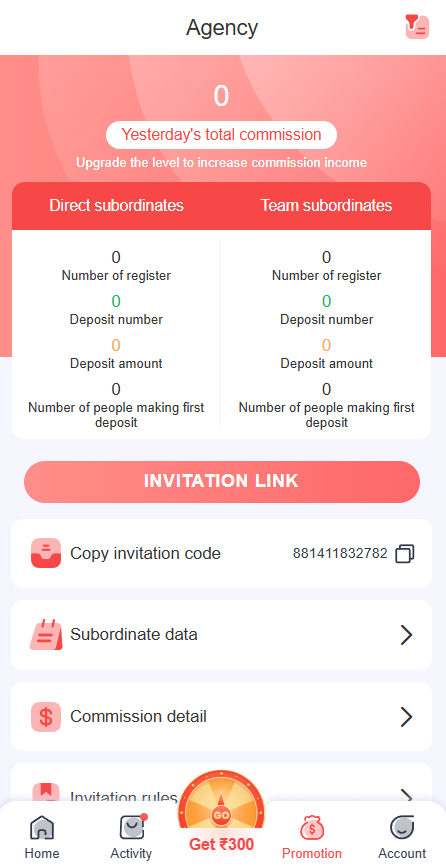
The Agency screen displays a Copy invitation code option.
A unique invitation code appears alongside a copy icon.
Users can use this feature when the current referral program allows them to invite others.
Do not share your invitation code publicly if you do not want your referral information exposed.
30. DG CLUB Invitation Link
The detailed Agency screen also displays a large:
INVITATION LINK
button.
This provides another route for accessing referral-related information.
Before sharing an invitation, check the current Invitation Rules and avoid making misleading promises about bonuses, earnings or guaranteed results.
31. DG CLUB Subordinate Data
The Subordinate data section provides information related to users connected through the Agency or invitation structure.
The detailed screen separates:
Direct subordinates
from
Team subordinates.
This gives Agency users a more detailed view of their invitation network.
32. DG CLUB Commission Detail
The Agency page contains a dedicated Commission detail option.
Users who participate in the applicable referral or Agency system can check commission-related information here.
Commission should not be treated as guaranteed income because eligibility and calculation depend on the current platform rules.
33. DG CLUB Invitation Rules
The Invitation rules menu is particularly important.
Anyone using DG CLUB referral or Agency features should read the current rules before sharing invitations or expecting promotional benefits.
Rules may cover registration, deposits, account eligibility, duplicate accounts and other qualifying requirements.
34. DG CLUB Rebate Ratio
The Agency interface also displays Rebate ratio.
This indicates that the Promotion section includes information relating to rebate structures.
Users should check their current account for the applicable figures and conditions rather than relying on old screenshots or third-party articles.
35. DG CLUB Promotion Data
The Promotion data panel displays statistics including:
- This Week
- Total commission
- Direct Subordinate
- Total number of subordinates in the team
The supplied screenshot shows zero values because those figures belong to the account shown at that time.
These numbers are account-specific and can change as activity changes.
36. Direct Subordinates and Team Subordinates
Another Agency screen provides a more detailed breakdown.
For Direct subordinates and Team subordinates, the interface displays:
- Number of register
- Deposit number
- Deposit amount
- Number of people making first deposit
This gives users a more detailed view of invitation-related activity.
37. Yesterday’s Total Commission
The Agency screen also contains a section labelled:
Yesterday’s total commission
The interface states:
“Upgrade the level to increase commission income.”
This is promotional language displayed by the platform. Users should review the current Agency terms before assuming that upgrading will result in a particular income level.
38. DG CLUB Invite Wheel
The Invite Wheel is one of the most visually distinctive features shown in the screenshots.
The page displays a large prize wheel with several amounts around it.
Visible amounts include:
- ₹5
- ₹10
- ₹20
- ₹30
- ₹50
- ₹80
- ₹300
At the centre of the wheel is:
X1 FREE SPIN
The page also includes:
INVITE FRIENDS TO GET SPIN
The example screen displays an account-specific amount and a countdown.
These figures are specific to the displayed account and promotion. They should not be interpreted as guaranteed rewards for every DG CLUB user.
39. DG CLUB Invite Wheel Record
Below the wheel is a Record section.
This provides a place for relevant Invite Wheel activity or records shown by the platform.
Checking in-platform records is preferable to relying on screenshots or messages from third parties.
40. DG CLUB Activity Interface
The Activity tab is dedicated to promotions, campaigns and reward-related features.
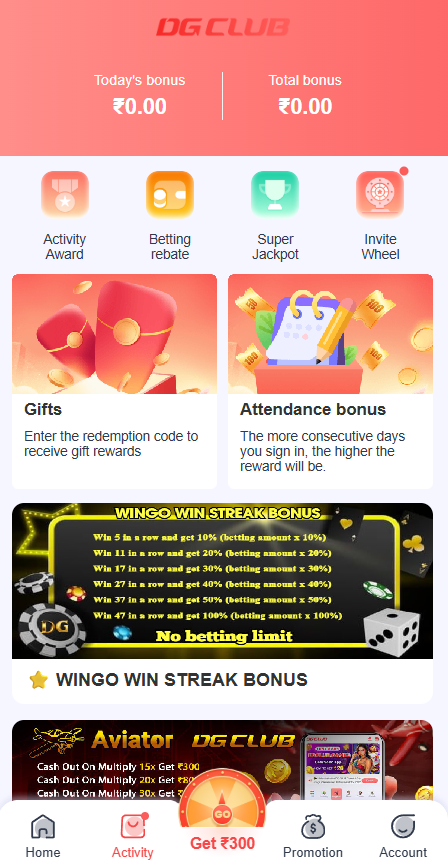
At the top, the screenshot displays:
Today’s bonus
and
Total bonus
The example account shows ₹0.00 for both.
Below these are four shortcuts:
- Activity Award
- Betting rebate
- Super Jackpot
- Invite Wheel
41. DG CLUB Activity Award
Activity Award provides access to applicable activity-related promotional features.
Users should check the individual campaign for current eligibility and conditions.
42. DG CLUB Betting Rebate
The Activity screen includes a Betting rebate option.
The availability and calculation of any rebate depends on the applicable promotion and account conditions.
Always check the current rules before participating.
43. DG CLUB Super Jackpot
Another Activity shortcut is Super Jackpot.
It appears alongside Activity Award, Betting rebate and Invite Wheel.
The feature should be viewed as a promotional section rather than a guarantee of a particular reward.
44. DG CLUB Gifts Promotion
The Activity page displays a Gifts card.
Its description says:
“Enter the redemption code to receive gift rewards.”
This shows that the DG CLUB interface can provide redemption-code campaigns.
Users should only use legitimate codes from trusted sources and should be cautious of anyone selling supposedly guaranteed reward codes.
45. DG CLUB Attendance Bonus
The Attendance bonus card is another feature shown on the Activity page.
The supplied interface states that the more consecutive days a user signs in, the higher the reward will be.
This is a promotional campaign shown in the screenshot, so users should check the current terms to understand the actual eligibility requirements.
46. DG CLUB Win Go Win Streak Bonus
The Activity page displays a promotional banner labelled:
WINGO WIN STREAK BONUS
The banner shows different streak levels and associated promotional conditions.
Because promotional campaigns can change, users should read the current terms displayed with the campaign instead of relying solely on the screenshot.
47. DG CLUB Aviator Games Promotion
Another Activity banner is dedicated to Aviator Games.
The supplied banner shows different multiplier levels and promotional cash-out conditions.
These are promotional terms shown in the interface, not guaranteed gaming outcomes.
Users should understand the applicable conditions before participating.
48. DG CLUB VIP Loss Rebate
The Activity page also displays:
VIP Loss Rebate
The accompanying banner promotes Daily Loss 10%.
The actual eligibility, calculation and terms should be checked within the current DG CLUB promotion because promotional percentages can change.
49. DG CLUB YouTube & Instagram Creative Video
A particularly interesting promotion is:
Youtube&Instagram Creative Video
The campaign encourages users to create video content about DG CLUB Games for YouTube and Instagram.
This demonstrates that the DG CLUB Activity area is not limited to traditional gaming promotions.
Users interested in this campaign should check the current content requirements and eligibility conditions.
50. DG CLUB Sign-Up Bonus
The Activity screenshots show another banner stating:
SIGN UP AND RECEIVE A ₹17 BONUS
The corresponding card is labelled:
UP AND RECEIVE A ₹17
This is an example of a promotional campaign displayed in the supplied interface.
Promotional values and eligibility can change, so users should check the current offer before relying on it.
51. DG CLUB Partner Rewards
The Activity area also contains:
Partner Rewards
The associated banner promotes inviting friends and receiving bonuses.
Users should read the current Partner Rewards terms to understand how the campaign works and what requirements apply.
52. DG CLUB Mystery Bonus
Another promotional feature is Mystery Bonus.
The interface uses a mystery-box design with question marks and coins.
Because the promotion is presented as a mystery reward, users should check the current campaign for the actual eligibility and reward conditions.
53. DG CLUB Official Announcement
The Activity screen also contains an:
Official Announcement
card.
The banner states:
DGCLUB GAMES OFFICIAL ANNOUNCEMENT!
This provides another place where users can find platform-related information.
When information from an old article conflicts with a current announcement inside DG CLUB, check the latest platform information before taking action.
54. DG CLUB Game Interface Navigation
The simplest way to understand the entire DG CLUB App interface is to remember what each bottom-navigation option does.
Home
Home = DG CLUB Games
Use this section to browse game categories and individual titles.
Activity
Activity = Bonuses and campaigns
Use this section to find promotions, activities and reward-related features.
Get ₹300
Get ₹300 = Promotional shortcut
This is the central promotional button visible in the screenshots. The displayed label should not be treated as a guaranteed payment.
Promotion
Promotion = Agency and invitations
Use this area for invitation codes, invitation links, subordinate information and commission-related tools.
Account
Account = Wallet and account management
Use this section for balance, deposits, withdrawals, history, settings and customer support.
55. DG CLUB Interface Map for Beginners
If you are using DG CLUB for the first time, you do not need to memorize every menu.
Use this simple map:
Want to find a game?
→ Open Home
Want Lottery games?
→ Home → Lottery
Want Original games?
→ Home → Original
Want DG CLUB Slots?
→ Home → Slots
Want Casino games?
→ Home → Casino
Want Sports games?
→ Home → Sports
Want to check bonuses?
→ Activity
Want to invite friends?
→ Promotion
Want your wallet?
→ Account → Enter wallet
Want to deposit?
→ Account → Deposit
Want to withdraw?
→ Account → Withdraw
Want previous game activity?
→ Account → Game History
Want transaction records?
→ Account → Transaction
Need support?
→ Account → Service Center → Customer Service
This makes the DG CLUB Game Interface much easier to navigate.
56. DG CLUB Activity vs Promotion
One common source of confusion is the difference between Activity and Promotion.
They are not exactly the same.
DG CLUB Activity
The screenshots show:
- Activity Award
- Betting rebate
- Super Jackpot
- Invite Wheel
- Gifts
- Attendance bonus
- Win Go Win Streak Bonus
- Aviator Games
- VIP Loss Rebate
- YouTube & Instagram Creative Video
- Sign-Up Bonus
- Partner Rewards
- Mystery Bonus
- Official Announcement
DG CLUB Promotion
The Promotion/Agency area shows:
- Copy invitation code
- Invitation link
- Subordinate data
- Commission detail
- Invitation rules
- Agent line customer service
- Rebate ratio
- Promotion data
A simple way to remember the difference is:
Activity = campaigns and promotional activities
Promotion = invitations, Agency and commission tools
57. DG CLUB Game History vs Transaction History
The Account section also separates different types of records.
Game History
Shows:
My game history
Transaction
Shows:
My transaction history
Deposit History
Shows:
My deposit history
Withdraw History
Shows:
My withdraw history
This separation makes it easier to locate a specific type of account information.
58. DG CLUB Games and the User Experience
The screenshots show that DG CLUB is designed around variety.
The game interface includes different themes such as:
- Lottery
- Cards
- Dice
- Plinko
- Mines
- Wheels
- Slots
- Cricket
- Football
- Racing
- Fishing
- Casual games
- Casino-style games
This means users do not have to approach the DG CLUB Game section with only one type of game in mind.
The category system lets users move between different formats depending on what they want to explore.
59. Why Understanding the DG CLUB Interface Matters
Knowing the interface can save time and also reduce mistakes.
For example, a user who knows where DG CLUB Withdraw is located does not need to follow a random third-party link.
Someone looking for transaction records can go directly to Transaction History.
A user looking for support can open Customer Service from the Service Center.
Someone interested in referral features can go directly to Promotion → Agency.
And someone looking for a specific game can use the Home categories instead of scrolling through the entire DG CLUB game library.
The interface therefore acts as a roadmap for the entire platform.
60. Security Tips for DG CLUB Users
A familiar interface can also make it easier to recognize suspicious activity.
When using DG CLUB, remember:
- Keep your DG CLUB Login details private.
- Never share your password.
- Never provide OTPs to another person.
- Check payment details before confirming a transaction.
- Verify withdrawal information carefully.
- Avoid unofficial DG CLUB download links.
- Be cautious of fake customer-support accounts.
- Do not publish your UID unnecessarily.
- Check current promotion rules before participating.
- Avoid promises of guaranteed winnings or guaranteed bonuses.
If someone contacts you privately claiming to be DG CLUB support, verify the request through the legitimate support route available inside the platform.
61. Promotional Information Can Change
The supplied screenshots contain many promotional figures and messages, including:
- ₹300
- ₹17
- Invite Wheel amounts
- Rebate promotions
- Commission information
- Attendance rewards
- VIP promotions
- Mystery Bonus
- Partner Rewards
These should be treated as campaign information shown at a particular time, not permanent guarantees.
Before relying on a DG CLUB Bonus, check:
Eligibility → Requirements → Reward → Restrictions → Expiry
This is especially important for promotions involving deposits, gaming activity, referrals or withdrawals.
Frequently Asked Questions About the DG CLUB Game Interface
What is the DG CLUB Game Interface?
The DG CLUB Game Interface is the platform’s main user interface for accessing games, account functions, wallet tools, promotions, activities, transaction records and customer support.
What is the DG CLUB App?
The DG CLUB App refers to the mobile application or mobile access experience used to access supported DG CLUB features. Users should always verify the current official source before downloading an application.
Where can I find DG CLUB Games?
Open Home after DG CLUB Login. The game area provides categories including All, Lottery, Original, Slots, Casino and Sports.
What are the main DG CLUB Game categories?
The screenshots show Lottery, Original, Slots, Casino and Sports, along with an All Games option.
Where can I find DG CLUB Lottery games?
Open Home and select Lottery. The supplied interface shows Win Go, K3 Lotre, 5D Lotre, TRX Win and Moto Racing.
Does DG CLUB have Slots?
Yes. The screenshots show dedicated Slots collections, including Bgaming, CQ9 and EVO Electronic Slots.
Does DG CLUB have Casino games?
The interface shows casino-style games including Blackjack, Dice, Hilo, Plinko, Heads & Tails, Roulette, Poker and Keno.
Does DG CLUB have Sports games?
Sports-related titles and themes are visible, including Cricket, Football, Penalty and racing-related games.
Where is DG CLUB Login?
Users access the platform through the supported DG CLUB login method. After logging in, the main navigation provides access to Home, Activity, Promotion and Account.
Where can I check my DG CLUB balance?
Open Account. The Total balance is displayed near the top of the Account dashboard.
Where is DG CLUB Wallet?
The Account screen includes Enter wallet, along with ARWallet, Deposit and Withdraw shortcuts.
Where can I make a DG CLUB Deposit?
Open Account → Deposit and follow the current instructions displayed by the platform.
Where is DG CLUB Withdraw?
Open Account → Withdraw. The same page also provides access to Withdraw History.
Where can I find DG CLUB Game History?
Go to Account → Game History.
Where can I find DG CLUB Transaction History?
Go to Account → Transaction to access the transaction history section.
Where can I find DG CLUB Deposit History?
The Account page includes Deposit – My deposit history.
Where can I find DG CLUB Withdraw History?
The Account page includes Withdraw – My withdraw history.
What is the DG CLUB Promotion section?
The Promotion section provides Agency-related features including invitation codes, invitation links, subordinate data, commission details, invitation rules and rebate information.
What is DG CLUB Activity?
Activity is the promotional section containing features such as Activity Award, Betting Rebate, Super Jackpot, Invite Wheel, Gifts, Attendance Bonus and other campaigns.
What is the DG CLUB Invite Wheel?
Invite Wheel is an invitation-related promotional feature displayed in the DG CLUB interface. The supplied screenshot shows a wheel with different displayed amounts and a Free Spin option.
Where can I find DG CLUB Customer Service?
Go to:
Account → Service Center → Customer Service
Where can I find DG CLUB Settings?
Open:
Account → Service Center → Settings
Does DG CLUB have a Beginner’s Guide?
Yes. The Account Service Center shown in the screenshot includes a Beginner’s Guide option.
Where can I find DG CLUB announcements?
Announcements can appear through the Announcement option in the Service Center and through promotional announcement cards in Activity.
What does the Get ₹300 button mean?
It is the promotional shortcut displayed in the centre of the bottom navigation. The label should not be interpreted as a guaranteed payment to every user.
Final Thoughts on the DG CLUB Game Interface
The DG CLUB Game Interface is built around several connected sections rather than one single game screen.
The Home page is where you explore DG CLUB Games, with categories for Lottery, Original, Slots, Casino and Sports.
The Account page handles your DG CLUB Account, including Total Balance, DG CLUB Wallet, ARWallet, Deposit, Withdraw, VIP, Game History, Transaction History, Deposit History and Withdraw History.
The Activity section brings together DG CLUB Bonus campaigns, attendance promotions, Invite Wheel, Gifts, Win Go promotions, Aviator campaigns, VIP Loss Rebate, Partner Rewards, Mystery Bonus and official announcements.
The Promotion section provides Agency-related tools such as invitation codes, invitation links, subordinate data, commission details, invitation rules and rebate information.
For new users, the easiest approach is to remember:
DG CLUB Home → Games
DG CLUB Activity → Promotions
DG CLUB Promotion → Invitations & Agency
DG CLUB Account → Wallet & Account
DG CLUB Service Center → Help & Information
Once these sections become familiar, navigating the DG CLUB App or mobile interface becomes much more straightforward.
Game availability, bonuses, promotional amounts, payment features and other interface elements may change over time. Always check the latest information shown within DG CLUB before making transactions or participating in promotions, and use real-money gaming features responsibly and only where permitted.
Comments
One response
Hi, this is a comment.
To get started with moderating, editing, and deleting comments, please visit the Comments screen in the dashboard.
Commenter avatars come from Gravatar.