
If you are new to DG Club or have run into a problem while using the platform, you probably have a few questions about registration, login, the app, games, wallet, deposits, withdrawals, or account access.
This DG Club FAQ brings the most common questions together in one place. Instead of searching through several separate guides, you can use the sections below to quickly find information about the part of DG Club you are interested in.
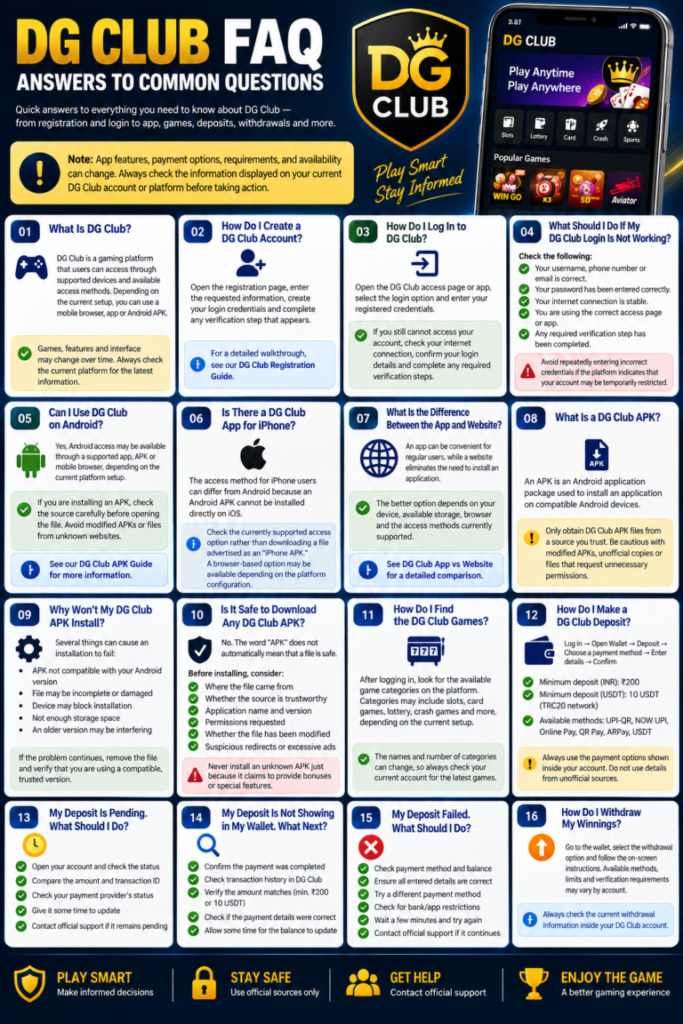
Note: App features, payment options, requirements, and availability can change. Always check the information displayed on your current DG Club account or platform before taking action.
What Is DG Club?
DG Club is a gaming platform that users can access through supported devices and available access methods. Depending on the current setup, users may interact with the platform through a mobile browser, app, or Android APK.
The exact games, account features, payment options, and interface can change over time, so the current platform should always be treated as the most relevant source for feature availability.
How Do I Create a DG Club Account?
The usual process begins with opening the registration page, entering the requested information, creating your login credentials, and completing any verification step that appears.
Before registering, make sure you are using the correct access page and entering your information carefully.
For a detailed walkthrough, see our DG Club Registration Guide.
How Do I Log In to DG Club?
Open the supported DG Club access page or application, select the login option, and enter your registered credentials.
If your details are correct but you still cannot access the account, check your internet connection, confirm that you are using the correct login information, and look for any verification or account messages.
What Should I Do If My DG Club Login Is Not Working?
First, check that:
- Your username, phone number, or email is correct.
- Your password has been entered correctly.
- Your internet connection is stable.
- You are using the correct DG Club access page or app.
- Any required verification step has been completed.
Avoid repeatedly entering incorrect credentials if the platform indicates that your account may be temporarily restricted.
Can I Use DG Club on Android?
Android access may be available through a supported app, APK, or mobile browser, depending on the current platform setup.
If you are installing an APK, check the source carefully before opening the file. Avoid modified APKs or files from unknown websites simply because they claim to provide extra features.
See our DG Club APK Guide for more information.
Is There a DG Club App for iPhone?
The access method for iPhone users can differ from Android because an Android APK cannot be installed directly on iOS.
If you are using an iPhone, check the currently supported DG Club access option rather than downloading a file advertised as an “iPhone APK.”
A browser-based option may be available depending on the current platform configuration.
What Is the Difference Between the DG Club App and Website?
An app can be convenient for users who access the platform regularly, while a website can eliminate the need to install an application.
The better option depends on your device, available storage, browser, and the access methods currently supported.
For a detailed comparison, see DG Club App vs Website.
What Is a DG Club APK?
An APK is an Android application package used to install an application on compatible Android devices.
A DG Club APK should only be obtained from a source you have reason to trust. Be particularly cautious with modified APKs, unofficial copies, or files that request unnecessary permissions.
Why Won’t My DG Club APK Install?
Several things can cause an APK installation to fail:
- The APK may not be compatible with your Android version.
- The file may be incomplete or damaged.
- Your device may block installation from the selected source.
- There may not be enough storage space.
- An older version of the application may be interfering with installation.
If the problem continues, remove the problematic file and verify that you are using a compatible, trusted version.
Is It Safe to Download Any DG Club APK?
No. The word “APK” does not automatically mean that a file is safe.
Before installing an APK, consider:
- Where the file came from.
- Whether the source is trustworthy.
- Whether the application name and version look legitimate.
- What permissions the application requests.
- Whether the file has been modified.
- Whether the download page contains suspicious redirects or excessive advertisements.
Never install an unknown APK simply because it claims to provide bonuses, unlimited access, or special features.
How Do I Find the DG Club Games?
After accessing your account, look for the available game or gaming section within the current interface.
The exact layout and categories can change, so navigation may look different across devices or platform versions.
If a particular game is unavailable, check whether it is currently listed in your account rather than relying on an old screenshot or third-party list.
Why Is a DG Club Game Not Loading?
A game may fail to load because of:
- A weak internet connection.
- Browser problems.
- An outdated app or browser.
- Temporary platform issues.
- Device compatibility problems.
- A problem with the individual game.
Try refreshing the page, checking your connection, restarting the application or browser, and trying again later.
If other games work normally while one game does not, the issue may be specific to that game.
What Is the DG Club Wallet?
The wallet is the part of the account interface used to display and manage balance-related activity.
Depending on the current platform configuration, it may contain options related to deposits, withdrawals, balance information, and transaction records.
Always check the wallet section inside your account for the latest available options.
How Do I Make a DG Club Deposit?
The general process is:
- Log in to your DG Club account.
- Open the wallet or balance section.
- Select the deposit option.
- Choose one of the available payment methods.
- Enter the required amount and payment details.
- Complete the payment.
- Check the transaction or wallet status.
The available methods and requirements can change, so follow the instructions displayed during your current deposit.
What Deposit Methods Are Available on DG Club?
The deposit interface may show methods such as:
- UPI-QR
- NOW UPI
- Online Pay
- QR Pay
- ARPay
- USDT
Availability can depend on the current platform configuration and account interface.
For USDT deposits, check the selected network carefully before confirming a transaction.
What Is the Minimum DG Club Deposit?
The deposit requirements displayed in the current DG Club deposit interface include a ₹200 minimum for INR deposits and a 10 USDT minimum for USDT deposits.
For USDT, the interface specifies the TRC20 network.
Because payment requirements can change, always confirm the minimum shown on the deposit screen before making a transaction.
What Should I Do If My DG Club Deposit Is Pending?
A pending deposit does not necessarily mean you should immediately make another payment.
First:
- Check the transaction status.
- Review your wallet or transaction history.
- Confirm the amount.
- Check the payment details.
- Save the transaction reference or receipt.
- Wait for the status to update before attempting another transaction.
If the transaction remains unresolved, contact the appropriate support channel with the relevant transaction information.
Why Is My DG Club Deposit Not Showing?
If money has been sent but the balance has not updated, check whether the transaction is still pending or has failed.
Also verify:
- The amount sent.
- The payment method used.
- The transaction reference.
- Your account details.
- The current wallet balance.
- The transaction history.
Do not immediately send another payment simply because the first transaction has not appeared.
What If My Money Was Deducted but My DG Club Balance Did Not Update?
Keep the payment confirmation and transaction reference.
Then check whether the transaction is marked as pending, completed, failed, or otherwise unresolved.
If the payment was completed but the balance remains incorrect, provide the relevant transaction information through the appropriate support process.
Never give another person your password, OTP, PIN, or private wallet key while asking for help.
What Happens If a DG Club Deposit Fails?
A failed deposit should be checked against the payment status and transaction history before you try again.
Confirm that:
- The payment details were correct.
- The amount met the displayed minimum.
- The selected payment method was available.
- The transaction was not already processed.
- There was no issue with the payment provider.
If money was deducted despite the failed status, keep your payment evidence and investigate the original transaction before making another payment.
What Should I Know About DG Club USDT Deposits?
If you use USDT, pay particular attention to the network.
The current deposit information specifies TRC20 for USDT. Sending cryptocurrency through an incompatible network can create a serious transaction problem.
Before confirming a crypto transaction, carefully verify the address, network, amount, and other displayed details.

Can I Deposit Less Than the Minimum Amount?
If the platform displays a minimum deposit, sending less than that amount may result in the transaction not being credited as expected.
The current deposit interface shows ₹200 for INR and 10 USDT for USDT.
Always check the live deposit screen before sending funds because minimums and available methods can change.
How Do I Withdraw From DG Club?
If withdrawal functionality is available on your account, it is generally accessed through the wallet or balance section.
The process may involve:
- Opening the wallet.
- Selecting withdrawal.
- Choosing an available withdrawal method.
- Entering the requested information.
- Reviewing the amount and details.
- Confirming the request.
- Checking the withdrawal status.
Follow the current instructions displayed by the platform because requirements may change.
Why Is My DG Club Withdrawal Pending?
A pending withdrawal means the request has not reached a final status yet.
Check your withdrawal history and confirm that the request details are correct.
Avoid submitting multiple withdrawal requests for the same amount while the original request is still pending.
If the status does not resolve, keep the withdrawal reference and contact the appropriate support channel.
What If My DG Club Withdrawal Has Not Arrived?
First, check the withdrawal status in your account.
If it shows as completed but the funds have not arrived at the destination, keep the transaction reference and any relevant confirmation information.
Check the destination details you entered and contact support if the transaction cannot be resolved through the normal account interface.
Why Is My DG Club Balance Not Correct?
A balance can appear different from what you expect because of a pending transaction, completed transaction, game activity, or an account update that has not yet appeared.
Check your transaction history rather than relying only on the current balance number.
If you find a transaction that does not match your records, save the relevant details before contacting support.
What Information Should I Save When There Is a Payment Problem?
Useful information can include:
- Transaction ID or reference
- Date and time
- Amount
- Payment method
- Transaction status
- Relevant screenshot or receipt
- Account identifier requested by official support
Do not send your password, OTP, PIN, or private cryptocurrency keys.
What Should I Do If DG Club Is Not Opening?
Try these basic checks:
- Test your internet connection.
- Refresh the page.
- Restart your browser or app.
- Clear relevant browser cache if necessary.
- Try another supported browser.
- Check whether the issue affects only your device.
- Try again later if there appears to be a temporary service issue.
Avoid downloading random replacement applications from search results simply because the normal access page is not loading.
Why Is DG Club Slow on My Phone?
Performance can be affected by your internet connection, device resources, browser cache, application version, or the complexity of the page or game being loaded.
Closing unnecessary applications, restarting the browser, checking your connection, and keeping the supported software updated may help.
Can I Use DG Club on Multiple Devices?
Accessing an account from different supported devices may be possible, but you should follow the platform’s current account rules.
Keep your login credentials private and avoid sharing your account with other people.
If the platform shows a security warning after switching devices, follow the instructions presented by the account system.
Can I Have More Than One DG Club Account?
Do not assume that multiple accounts are permitted.
Check the current account rules before creating another account. If you already have an account but cannot access it, recovering the existing account is generally preferable to immediately creating another one.
What Should I Do If I Forget My DG Club Password?
Use the available password-recovery option on the current login page.
Follow the verification instructions and create a new password that is difficult for other people to guess.
Avoid using the same password across multiple important accounts.
What If I Cannot Receive the Verification Code?
Check that the registered contact information is correct and that your phone or email service is working normally.
You can also check for blocked messages or spam filters where applicable.
Avoid repeatedly requesting codes in a short period if the platform limits verification attempts.
How Do I Contact DG Club Support?
Use the support or help option available through the current DG Club platform or account interface.
When contacting support about a transaction, provide useful reference information but keep sensitive credentials private.
A legitimate support representative should not need your password or private cryptocurrency key to investigate a basic account or payment issue.
What Should I Never Share With DG Club Support?
Never casually share:
- Your account password
- OTP or verification codes
- ATM PIN
- Banking password
- Cryptocurrency private key
- Recovery phrase
If someone claiming to be support requests these details, treat the request as suspicious and verify that you are using the correct support channel.
How Can I Avoid Fake DG Club Websites or Apps?
Before logging in or downloading anything, check the source carefully.
Be cautious when you encounter:
- Strange domain names
- Suspicious redirects
- Unusual download prompts
- Modified APK claims
- Requests for unnecessary permissions
- Fake customer-support accounts
- Promises of guaranteed results
- Pages asking for sensitive credentials
Do not assume that a website or application is legitimate simply because it uses the DG Club name.
Is DG Club the Same as the DG Club APK?
Not exactly.
DG Club refers to the platform or service, while an APK is an Android application package used to install an application.
An APK is simply a distribution format. Its presence does not by itself prove that a particular file is official or safe.
Is DG Club Available on iPhone and Android in the Same Way?
No. Android and iPhone use different application systems.
Android can support APK installation, while iPhone uses Apple’s application ecosystem and does not directly install Android APK files.
For that reason, an “DG Club APK for iPhone” claim should be treated carefully.
Why Does DG Club Look Different on My Phone?
The interface can vary according to:
- Device size
- Operating system
- Browser
- Application version
- Platform updates
- Screen orientation
A difference in appearance does not automatically mean that something is wrong with your account.
Should I Use a Modified DG Club APK?
It is better to avoid modified APKs from unknown sources.
A modified application may have been changed from the original software and could introduce security, privacy, compatibility, or account risks.
Use a trusted and verifiable access method whenever possible.
Can I Trust Every DG Club Promotion I See Online?
No.
Promotional information found on third-party websites, social media, messaging groups, or advertisements may be outdated or inaccurate.
Before acting on a promotion, verify the terms through the platform itself and check any eligibility requirements carefully.
Is DG Club Suitable for Everyone?
Gaming involving money can carry financial risk.
Only use funds you can afford to lose, understand the rules before participating, and avoid chasing losses by increasing your spending.
If gaming is becoming difficult to control, taking a break is a sensible step.
What Is the Best Way to Troubleshoot a DG Club Problem?
Start with the simplest explanation before taking major action.
A useful troubleshooting sequence is:
Check connection → Check account → Check transaction status → Check device/browser → Check platform message → Contact support if necessary
Most importantly, avoid repeating payments or installing random applications while trying to solve an unrelated problem.
Where Can I Find More DG Club Information?
For more detailed information, use the relevant guide rather than trying to cover every topic in one FAQ.
Useful supporting guides include:
- DG Club Game Guide
- DG Club APK Guide
- DG Club App Download for Android
- DG Club App for iPhone
- DG Club App vs Website
- DG Club Account Guide
- DG Club Registration Guide
- DG Club Wallet Guide
- DG Club Deposit Guide
- DG Club Deposit Methods
- DG Club Deposit Problem Guide
These pages can provide more detailed explanations for specific issues covered briefly in this FAQ.
Final Thoughts
The easiest way to use DG Club is to understand the basics before moving into account, wallet, payment, and gaming features.
If you are having a problem, avoid guessing or repeatedly trying the same action. Check the account or transaction status first, verify the information you entered, and keep useful records such as transaction references and screenshots.
For APKs, payments, and account credentials, security should always come before convenience. Use trusted access methods, verify important details before confirming transactions, and never share passwords, OTPs, PINs, or private cryptocurrency keys.