
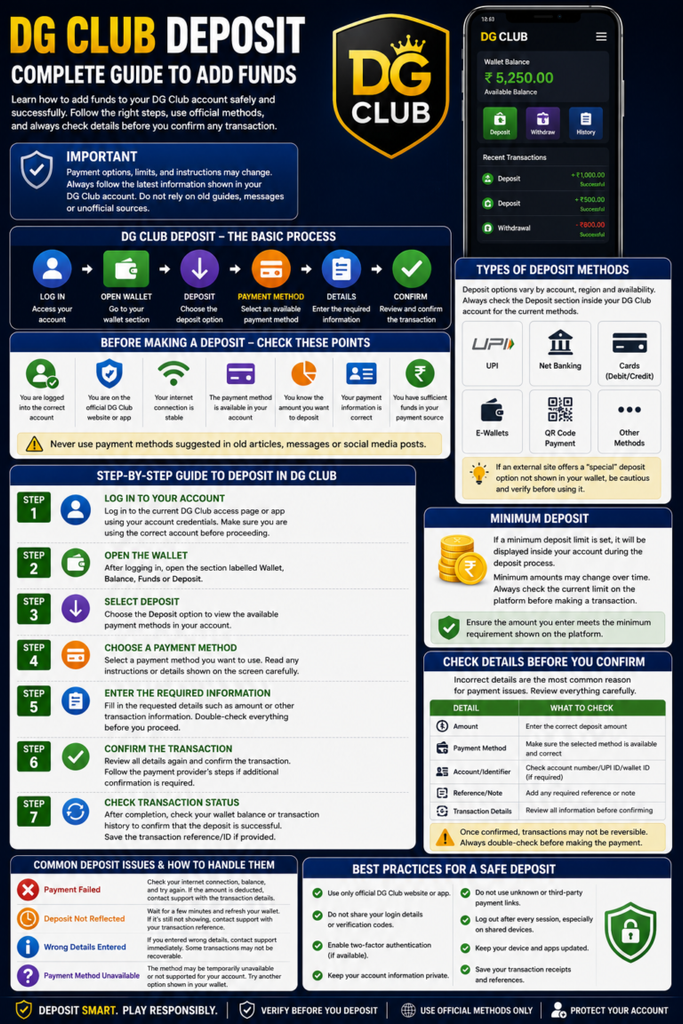
When it comes to the process of making a deposit on DG Club, it’s important to make a correct choice when it comes to the payment method. Payment information from random websites and social media posts should not be trusted – the user should first confirm which payment methods are offered on their DG Club account.
Currently, the available deposit screen presents several options to deposit, namely UPI-QR, NOW UPI, Online Pay, QR Pay, USDT and ARPay options.
There are also varying minimums depending on the currency used. The minimum amount for INR deposits is ₹200 and the minimum amount for USDT deposits is 10 USDT with deposits being accepted only on the TRC20 network.
Always remember to review payment options and payment information from within your own DG Club account prior to transacting.
DG Club Deposit Methods at a Glance
There are several options for the deposit in the deposit section. Which one you select may rely on the currency you wish to use and what payment methods are visible in your account.
The following options are available:
- UPI-QR
- NOW UPI
- Online Pay
- QR Pay
- USDT
- ARPay
- PayTM
- Google Pay
- Airtel Payment
- Skrill
- Neteller
- Visa Card
- PhonePe
- FK Wallet
- bKash
- Jeton
The payment options are tailored to Indian payment methods when using the INR route. The process of a transaction is different if you select USDT as the payment method because USDT is a cryptocurrency network.
1. UPI-QR
One of the payment methods displayed in the INR payment section on DG Club is UPI-QR.
The payment address should not be manually entered from an external source and should be opened from the account where the QR is displayed.
Prior to Confirming a payment, check:
The amount you plan to make an initial investment in your account.
- The payment details shown on the DG Club deposit screen
- The QR information
- Your transaction details
The lowest amount of money that can be deposited in the account.
Minimum amount for INR deposits is ₹200.
Why checking the QR matters
A QR code is not one to be copied from a previous screen capture or received from someone else. Payment information may be subject to change, so it’s better to use information that is shown in your current account.
2. NOW UPI
Another option using UPI is NOW UPI, which is also shown in the Deposit section of the DG Club.
The concept is simple: choose the payment method in your account, input the amount that you wish to contribute, and follow the payment instructions on the screen carefully.
Don’t take it for granted that the old payment address or UPI detail will be valid for a long time. Use the information given at the time of your current deposit.
When making a deposit, remember the minimum balance is ₹200 for INR deposits.
3. Online Pay
If the user decides to make an INR deposit, he can choose the Online Pay option.
The key point with this approach is not just choosing the payment button. It is verifying the transaction details before finalising the transaction.
A good habit is to:
Log-in to your DG Club account.
2. Go to the deposit section.
3. Select Online Pay.
4. Type in the desired INR value.
5. Read the instructions shown.
7. Fill out the payment with the details supplied.
8. Go back to your account and view your wallet balance.
If the payment seems to have been made and the balance still hasn’t updated, do not immediately make another payment. First, confirm if it is a transaction and payment history.
4. QR Pay
QR Pay is also a payment method available in the DG Club deposit page.
When having QR-based payments, it is critical that you use the QR code that is now up on the deposit system, not one that is stored from a previous payment.
Before scanning:
Verify that you are in the right account.
Review the amount of the deposit.
Check QR information.
Ensure the payment is being made towards the desired transaction.
Wait until the payment is confirmed until you remove the payment confirmation.
For INR deposits, there is no minimum amount requirement.
5. ARPay
Other options for depositing funds into DG Club include ARPay.
If ARPay is available in your account, then you will be able to click on it in the deposit tab and then you can proceed according to the instructions given there.
What is important here is that the users should not follow instructions from third parties about where to send money. The inside of the deposit screen within the account should really be the major reference for the transaction.
INR deposits have a minimum of ₹200.
6. USDT Deposit
USDT is unlike the INR payment options.
DG Club allows deposits on USDT tokens (TRC20 network only).
The smallest amount for USDT deposit is:
10 USDT
This is one of the most crucial aspects to verify prior to sending cryptocurrency, as it is a crucial component of the network.
The TRC20 is the only network that DG Club USDT operates on.DG Club USDT only operates on the TRC20 network.
In the USDT deposit menu, please choose:
Network: TRC20
Please avoid sending USDT across a different network when deposit instructions ask to send it across TRC20.
For instance, choosing a different network because it’s available in your crypto wallet may cause a severe transaction issue. The transfer of cryptocurrency is not a standard UPI transfer and therefore the information of the network should be verified before confirming the transfer.
The minimum deposit for the DG Club USDT is $10.DG Club USDT’s minimum deposit is $10.
The lowest amount to deposit USDT is:
10 USDT
For depositing USDT, please confirm the deposit with amount of 100+ USD minimum.
It’s also a good idea to take into account any network or transaction fees charged to you by your wallet or exchange when calculating how much you’ll have after the transaction is completed.
The minimum deposits for clubs of the DG Series are set as follows:
It is simple to say what the minimums are at this time:
| American Express | Dollars | 5,000 |
|---|---|---|
| UPI-QR | INR | ₹200 |
| NOW UPI | INR | ₹200 |
| Online Pay | INR | ₹200 |
| QR Pay | INR | ₹200 |
| ARPay | INR | ₹200 |
| USDT | USDT | 10 USDT |
The most crucial difference is the currency and network: INR deposits will use the available INR payment options, whereas USDT deposits will necessitate the TRC20 network.
INR Deposit vs USDT Deposit
You’ll see that they’re both pretty similar if you’re thinking of which one to choose, apart from the way they’re paid.
| Feature | INR Deposit | USDT Deposit |
|---|---|---|
| Currency | INR | USDT |
| Minimum | ₹200 | 10 USDT |
| Payment type | UPI / online / QR-based options | Cryptocurrency |
| Network requirement | Not applicable | TRC20 |
| What to check | Payment information and quantity | Wallet address, network and quantity |
For those who are already making payments in India, INR could be a more familiar choice. However, users who are selecting USDT must give special attention to the blockchain network.
To make a successful contribution to DG Club, there are several things to keep in mind:
One little thing can be the difference between a deposit that works and one that doesn’t. Before clicking on the last payment button, make sure to look at the following:
1. Check the minimum
The minimum amount for INR is ₹200.
The minimum amount for USDT is 10 USDT.
2. Check the payment information
Use the payment details you used when you last deposited.
Avoid using:
- Old screenshots
Details of payments from strangers.Details on payments from strangers. - Social media posts
Random messages sent via Telegram or WhatsApp. - Unofficial websites
3. Check USDT Network
This is an important point to keep in mind.
DG Club USDT deposits are only supported by TRC20.
If you are asked to choose a network, check to ensure that TRC20 is checked before you send.
4. Check the amount
Ensure that the amount in the payment app or crypto wallet is the same amount that you want to send.
5. Maintain transaction record
Once a payment is made, you should hold on to the confirmation or transaction reference until the money is deposited in your DG Club wallet.
This can be helpful when trying to find out what happened to a pending or missing deposit later.
What if you use the wrong USDT Network?
The transactions related to the USDT rely on the blockchain networks. Funds may not be credited as expected if sent via a network that is not supported by the receiving deposit system.
This is the reason why the network should be tested before confirming a USDT transfer.
As simple as it gets, the rule for depositing in DG Club USDT is:
Use TRC20 only.
If you’re not sure what the network that you’re seeing in the wallet is, stop before sending the money and check the deposit instructions.
If the deposit isn’t showing, what happens?
Don’t make another deposit right away.
First check:
- If the payment actually took place or not.
- If the transaction is successful or not on your payment app or wallet.
- If it was the proper amount or not.
- If you deposited minimum amount.
- If you entered your payment information correctly.
- If you chose TRC20 for USDT, click button 1.If you have chosen USDT as TRC20, click button 1.
- If the DG wallet or DG transaction history has been updated.
In case of an unresolved transaction, retain payment reference and other transaction details as they will be needed when reaching official support.
See DG Club Deposit Problems: Pending, Failed & Missing Deposits for a more detailed troubleshooting guide.
Please refer to the payment details for the correct address.
Users often do the biggest mistake when they consider payment details as permanent.
It is not acceptable to automatically re-use a QR code or payment address because it has worked in the past.
Rather, there are simple rules to follow:
Log in your DG Club account, go to the deposit section and choose your current payment method and use the information that appears.
It is particularly crucial when depositing cryptocurrencies since a UPI transfer might have problems, which are entirely different when the USDT wallet is sent to the wrong network or address.
Here are just a few tips to help you check your deposit safety at DG Club:
Before depositing, check out just a few things:
I am signed in to the right DG Club account.
I chose the payment option that I have in my account.
I have paid a minimum deposit. (Check this if you have paid a minimum deposit)
I reviewed the payment information before making payment: [ ] Yes, [ ] No.
- I am not using information from an unofficial source.
- If using USDT, I selected TRC20.
- My USDT amount is at least 10 USDT.
- My INR amount is at least ₹200.
- I will keep the transaction confirmation until the balance is updated.
Do not share your OTP or logon details with anyone.
In no case should you give out sensitive account information in order to receive payment support.
Do not share your:
- Password
- OTP
- Login credentials
Private Crypto Wallet Keys - Recovery phrase
If someone contacts you privately saying they are support, and requests a payment or transfer of funds to a personal account, please be extra cautious.
Instead, use the official support route that is provided within your DG Club account.
Frequently Asked Questions
Which deposit methods does DG Club support?
On the deposit screen, the following options are displayed: UPI-QR, NOW UPI, Online Pay, QR Pay, USDT and ARPay. Availability may be subject to what is shown in the user’s account.
What is the minimum amount that you have to pay as an initial club deposit in INR?
The minimum investment amount to start is ₹200.
The lowest amount of deposit that can be made to the DG Club USDT is $5.The smallest deposit required for DG Club USDT is $5.
The smallest amount of USDT to deposit is 10 USDT.
Which network does DG club support usdt?
DG Club only supports USDT on TRC20 network.
Is it possible to transfer DG Club USDT via another network?
You should not. Use only TRC20 if the instructions provided in the deposit order include TRC20.
Which has a better performance, INR or USDT?
No single answer for all users. INR deposits take advantage of the accessible Indian payment choices, and USDT will need cryptocurrency and cautious network choice. Pick the one which you comprehend and can confirm prior to making the transaction.
If your deposit for your DG Club has not been received, what should you do?
Verify the payment status, amount and transaction information. Never resubmit the same deposit over and over again until it’s resolved. If you need official support, make sure to retain the transaction reference.
Final Thoughts
It is not just about knowing the names of the payment methods; there are several options for deposits with DG Club. The user should be familiar with which currency is being used, the minimum, and the information to be verified before finalizing a transaction.
The minimum amount for INR deposits is ₹200 and you can use UPI-QR, NOW UPI, Online Pay, QR Pay and ARPay. For cryptocurrency users, DG Club offers support for USDT, the minimum amount is 10 USDT, and it is processed via the TRC20 network.
The most important rule: never use payment information from a different account or check the network prior to sending USDT.