
When using a gaming platform, the wallet is one of the areas users pay the most attention to. It is where account balances, transaction records, and available wallet functions are usually displayed.
This DG Club Wallet Guide explains the basics without assuming that every user sees the same options. Wallet features, supported payment methods, requirements, and interface layouts can change, so users should always check the information displayed inside their current DG Club account.
The goal of this guide is simple: understand the wallet, recognize common problems, and use account and transaction features carefully.
What Is the DG Club Wallet?
The DG Club wallet is the account area associated with balance and transaction-related functions.
Depending on the current platform setup, a wallet section may allow users to:
- View an available balance
- Review transaction records
- Add funds through supported methods
- Request a withdrawal where available
- Check transaction status
- Review previous wallet activity
The exact options can differ by account, device, region, or current platform configuration.
For that reason, avoid relying on old screenshots or third-party instructions that show wallet features that may no longer exist.
How the Wallet Connects to Your Account
Your wallet and your DG Club account are generally connected rather than being completely separate systems.
A simple way to understand the relationship is:
Account → Wallet → Transactions
Your account provides access to your profile and services, while the wallet section handles balance-related information.
This also means that keeping your account secure is important. If someone gains unauthorized access to your account, they may potentially gain access to wallet-related information as well.
For general account management, see our DG Club Account Guide.
How to Find the Wallet Section
The exact navigation can change, but wallet-related options are commonly found after logging into the account.
Look for labels such as:
- Wallet
- Balance
- Funds
- Transactions
- Deposit
- Withdrawal
- Transaction History
If you cannot find a wallet option, do not immediately assume that your account is broken.
The feature could have been moved, renamed, restricted, or changed as part of an updated interface.
If you are having broader account or access problems, our DG Club Troubleshooting Guide can help you work through the issue.
Understanding Your DG Club Balance
The balance shown in an account should be treated as the amount currently displayed by the platform.
However, it is important to distinguish between different types of balances if the interface provides them.
For example, a platform could display information such as:
| Wallet Information | What It May Represent |
|---|---|
| Available balance | Amount currently available according to the account |
| Pending amount | Transaction that has not completed |
| Transaction history | Previous wallet activity |
| Deposit record | Previously submitted funding transaction |
| Withdrawal record | Previously submitted withdrawal request |
Not every account will show all of these categories.
If the numbers do not appear to match your recent activity, check the transaction history before making another transaction.
Checking Transaction History
Transaction history is useful when you need to understand what happened to a wallet balance.
Before contacting support about a missing or incorrect transaction, review:
- Transaction date
- Transaction type
- Amount
- Transaction status
- Reference or transaction ID, if displayed
Keeping these details makes it easier to explain the problem accurately.
It can also prevent unnecessary repeated transactions when the first transaction is still being processed.
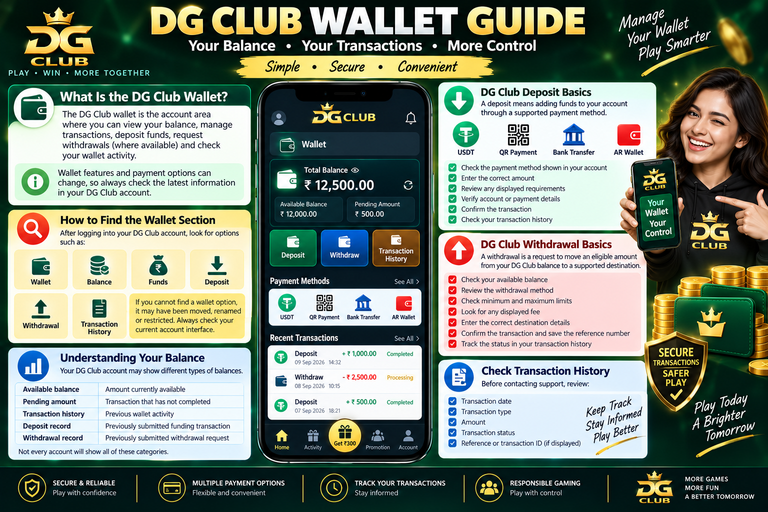
DG Club Deposit Basics
A deposit generally refers to adding funds to an account through one of the payment methods currently supported by the platform.
Because payment options can change, it is better to check the wallet page directly instead of relying on an old article that lists specific payment services.
Before submitting a deposit, check:
- The payment method shown in your account
- The amount entered
- Any displayed requirements
- Account or payment details
- The transaction confirmation
- Whether the transaction appears in your history
Never send money to a payment address provided through an unofficial social-media account, random website, or unknown individual claiming to represent DG Club.
DG Club Withdrawal Basics
A withdrawal generally refers to requesting funds from an account through a supported withdrawal method.
The available options and requirements may vary.
Before submitting a withdrawal request, carefully review the information shown on the current wallet page.
Pay particular attention to:
- Withdrawal method
- Account details
- Amount
- Any displayed requirements
- Transaction status
- Confirmation information
Do not assume that a withdrawal will always have the same processing time or requirements described on another website.
Current account information should take priority.
Why Your Balance May Not Update Immediately
Sometimes a wallet balance does not appear to change immediately after a transaction.
Possible reasons can include:
- The transaction is still pending
- The page has not refreshed
- The payment system has not confirmed the transaction
- The transaction was unsuccessful
- The account interface is experiencing a temporary issue
- The displayed balance and transaction record have different update times
The first step should be to check the transaction history.
Avoid repeatedly submitting the same transaction simply because the balance has not changed yet.
What Does a Pending Transaction Mean?
A pending transaction generally means that the transaction has not reached its final status.
If you see a pending status, record the available transaction information and check whether the platform provides additional instructions.
A pending transaction should not automatically be treated as a failed transaction.
Before trying again, determine whether the original transaction is still active.
What If a Transaction Fails?
A failed transaction can happen for several reasons.
For example:
- Incorrect information was entered
- The selected payment method was unavailable
- The transaction was rejected
- The connection failed during processing
- The account did not meet a displayed requirement
- The payment provider experienced an issue
Check the exact status and any message displayed by the platform.
If money was involved and the status remains unclear, keep the transaction reference and supporting details rather than repeatedly submitting new requests.
Incorrect Wallet Details
Entering incorrect payment or account information can create unnecessary complications.
Before confirming a transaction, double-check:
- Account information
- Payment details
- Amount
- Recipient information where applicable
- Transaction type
Take a moment to review everything before selecting the final confirmation button.
This is particularly important because correcting an already-submitted transaction may not always be simple.
DG Club Wallet Security
Wallet security starts with account security.
Use a strong, unique password and avoid sharing your login credentials with other people.
You should also:
- Avoid unofficial login pages
- Do not share verification codes
- Do not share passwords with support agents or strangers
- Avoid saving passwords on public computers
- Log out from shared devices
- Keep your phone or computer protected
- Check account activity regularly
If someone contacts you privately claiming they can “unlock” your wallet or process a transaction manually, treat the request with caution.
Watch Out for Fake Wallet Support
Scammers often use urgent messages to convince users that their account or wallet has a problem.
Common warning signs include:
- Requests for your password
- Requests for verification codes
- Requests to install unknown software
- Requests to send money to a personal account
- Claims that a payment must be made to unlock funds
- Pressure to act immediately
- Support accounts that cannot be verified through an official channel
Do not provide sensitive account information simply because someone claims to be customer support.
Use the platform’s current official support route whenever one is available.
Wallet Use on Android and iPhone
The wallet itself is generally an account function, but the way you access it can differ depending on your device.
Android
Android users may access their account through a supported app or mobile browser.
If using an APK, verify the source carefully before installing it. An unofficial modified application could create security risks.
Read our DG Club App Download for Android guide for more information about Android access.
iPhone
iPhone users do not install Android APK files.
If DG Club currently provides an iOS-compatible app, use the legitimate distribution method provided by the service. If not, access may be through a mobile browser or another officially supported method.
See our DG Club App for iPhone guide for the iOS-specific explanation.
App or Website: Which Is Better for Wallet Access?
There is no universal answer.
A supported app can be convenient for frequent users, while a mobile website may be easier when you do not want to install an application.
For wallet-related activity, the more important consideration is whether the access method is legitimate and secure.
Before entering account credentials, check the website address or application source carefully.
For a broader comparison, see DG Club App vs Website.
What to Do If Your Wallet Has a Problem
If you notice an unusual wallet issue, follow a simple process:
Step 1: Stop Repeating the Transaction
Do not immediately submit another payment or withdrawal request.
Step 2: Check the Transaction History
Look for the transaction and its current status.
Step 3: Record the Details
Save the amount, date, transaction ID, and status if available.
Step 4: Check the Account
Make sure you are logged into the correct account.
Step 5: Check for Platform Messages
Look for notifications or instructions connected to the transaction.
Step 6: Contact Official Support
If the issue remains unresolved, use the platform’s legitimate support channel.
Providing complete transaction information can make troubleshooting easier.
Common DG Club Wallet Problems
| Problem | What to Check |
|---|---|
| Balance not updated | Refresh and review transaction history |
| Transaction pending | Check current status and wait for final confirmation |
| Transaction failed | Read the displayed error or status |
| Withdrawal unavailable | Check current account requirements |
| Deposit not showing | Review transaction status and payment confirmation |
| Wallet page not loading | Check connection, browser/app, and account access |
| Unknown transaction | Secure the account and investigate immediately |
| Incorrect transaction details | Save the reference and contact official support |
Wallet Safety Checklist
Before using your DG Club wallet, ask yourself:
- Am I using the legitimate website or application?
- Have I checked the transaction details?
- Is the payment method currently supported?
- Did I review the transaction status?
- Am I using a secure internet connection?
- Have I protected my login credentials?
- Have I avoided sharing verification codes?
- Did I save the transaction reference if necessary?
These simple checks can prevent many avoidable mistakes.
Responsible Use Matters
Wallet management should not be separated from responsible gaming.
Never deposit money simply because you feel pressured to continue playing.
Set a personal spending limit and avoid using money needed for essential expenses.
If gaming stops feeling recreational and starts creating financial or personal problems, take a break and seek appropriate support.
Frequently Asked Questions
What is the DG Club wallet?
The DG Club wallet is the account section associated with balance and transaction-related functions. The exact features available can change.
How do I check my DG Club balance?
Log into your account and look for the wallet or balance section. The current interface should provide the most accurate information.
Why is my DG Club balance not updated?
The transaction may still be pending, the page may need refreshing, or the payment may not have been confirmed. Check transaction history before trying again.
Can I use the DG Club wallet on iPhone?
Wallet access depends on the current iOS-compatible access method provided by the service. iPhone users should not install Android APK files.
What should I do if a transaction is pending?
Check its status and keep the transaction reference. Avoid submitting a duplicate transaction until you understand what happened to the original request.
Should I give my password to wallet support?
No. Do not share your password or verification codes with people claiming to provide support.
Why is my withdrawal unavailable?
The reason depends on the current platform rules and account status. Check the wallet page for the latest requirements or messages.
Can I trust a person offering to fix my wallet through WhatsApp or social media?
Be very cautious. Use an official support route whenever possible and never share passwords, verification codes, or sensitive account information with strangers.
Final Thoughts
The DG Club wallet is an important part of managing account-related transactions, but users should not treat it as a simple payment screen.
Understanding balances, checking transaction history, confirming details, and recognizing suspicious requests can make wallet management much safer.
Most importantly, use the information displayed inside your current account rather than relying on outdated screenshots or third-party claims. Payment methods, wallet requirements, transaction procedures, and other features can change over time.
For the wider picture, continue with the DG Club Game Guide, or use the DG Club Troubleshooting Guide if you are dealing with a specific technical or account problem.